



Software that makes things clearer.

Technology,
in good order.

Understand what needs attention.
Stay in control of what happens next.

Nimstead Updater helps you manage supported app updates on Windows. Nimstead Business is being built for MSPs and IT/security teams to understand patch coverage and vulnerability evidence.

For Windows
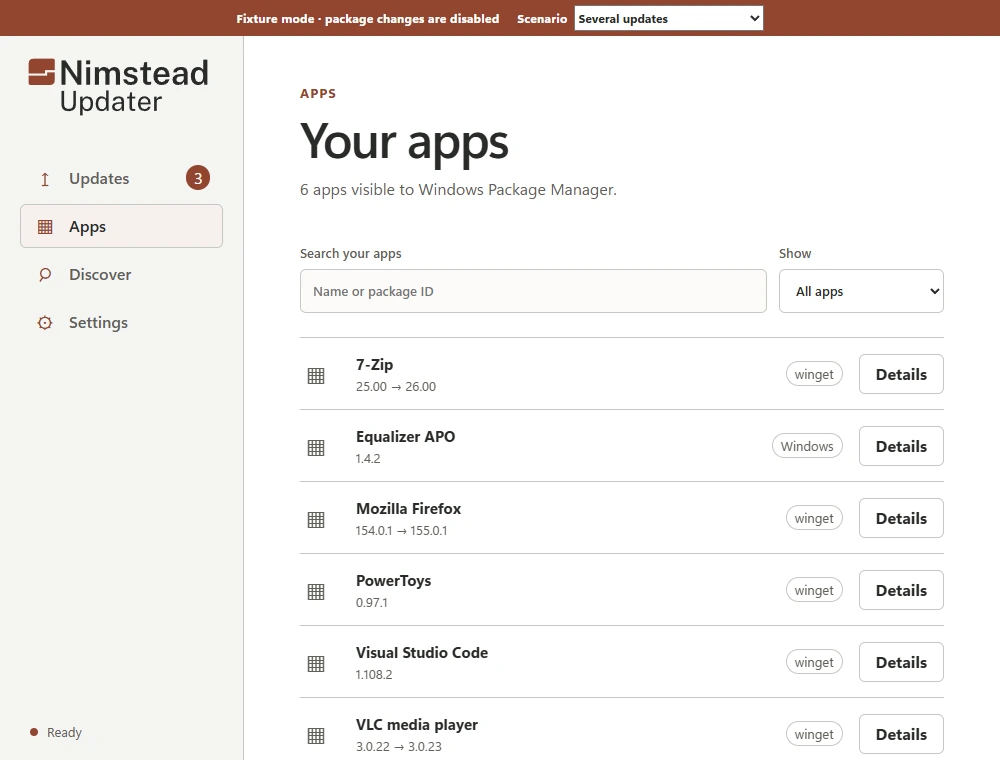
Nimstead Updater showing app versions and available updates, using sample dataNimstead Updater in dark mode showing app versions and available updates, using sample data
Available. Installed. Confirmed.Three different things. Explore the difference.

Development interface · sample data · In private beta

For your PC

Nimstead Updater

Review supported app updates on Windows, make a choice and understand the result.

For your IT team

Nimstead Business

Patch assurance and vulnerability evidence, with a clearer picture of what needs attention.

Nimstead Updater

Less guessing.
More getting on.

Updates shouldn’t leave you piecing together what happened. Updater brings supported updates and their results into one considered Windows experience.

Get to know Updater

In private beta. Public download not yet available.

Nimstead Updater showing supported updates in its deterministic preview fixtureNimstead Updater in dark mode showing supported updates in its deterministic preview fixture
Current development interface. Sample data. View full-size screenshot

Clarity, at every step

A result should
tell you something.

Explore the difference between an update running and knowing what happened.

Understanding an updateExample

Ready to review

An update is available

Example application · 2.4 → 2.5

Your decision comes first.

A clear starting point.

See the installed version, the available version and the source. An available update is an invitation to review, not permission to install.

How to read update results
Understanding an updateExample

Verification pending

Installer finished

Installed version has not yet been confirmed.

Recheck the evidence before calling it complete.

Finished isn’t always verified.

The installer has finished. That alone does not prove the new version is present. Keeping the two results separate makes the uncertainty visible.

How to read update results
Understanding an updateExample

Version confirmed

Expected version found

Example application · installed version 2.5

A result you can understand.

Confidence with a reason.

A fresh version check confirms the expected version. Now there is evidence behind the result, rather than a green tick based on an installer exit code.

How to read update results
Understanding an updateExample

Needs another check

Could not confirm the version

Previous information may be out of date.

Rechecking is different from reinstalling.

Uncertainty stays visible.

If a check cannot finish, the last known state is not a fresh result. The useful next step is to check again, not silently run the installer again.

How to read update results

Interactive explanation with example data. Recreated for this website, not an application screenshot. No software is checked or changed.

Nimstead Business

See the gaps.
Explain the picture.

For MSPs and IT/security teams, a patch count is only the beginning. Business is being built around coverage, vulnerability evidence and reporting.

Explore Business

In development

One finding. The useful context.Illustrative record · example data

Example application

Unknown
Observed version
4.2
Source
Inventory import
Observed at
2 October 2026, 09:40
Vulnerability match
Not established

There isn’t enough evidence to call this unaffected.

Understand what “unknown” means

Made by Nimstead

Care is in
the details.

Meet the maker

Tell the whole story.

A useful result says what is known, what isn’t and what to do next.

Make control understandable.

Clear choices, visible consequences and no unexplained actions.

Respect your attention.

Software should help you get on with your work. This site starts with readable pages, no account and no tracking scripts.